Your Personal Location Organiser Save it. Organise it.
Navigate your way.

PinPilot works alongside your favourite navigation app. Save locations, organise them into folders, plan multi-stop routes, send pins to friends or share them by link and QR code, then launch Google Maps, Waze, Apple Maps or any nav app with a single tap.

Scroll to explore
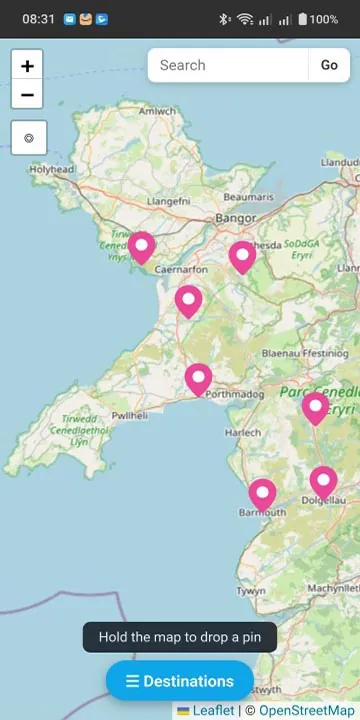
PinPilot map of Wales with saved location pins
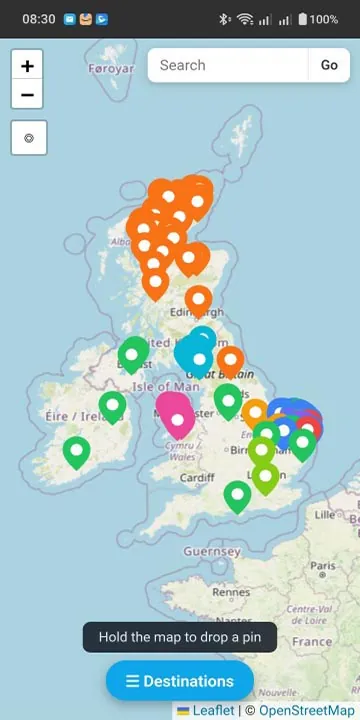
PinPilot map with colour-coded pins across the UK and Ireland
Works withGoogle MapsWazeApple MapsTomTomHERE WeGo+ more Works withGoogle MapsWazeApple MapsTomTomHERE WeGo+ more

Everything you need to
organise your world

Unlike standard map apps that bury your saved places in one long list, PinPilot gives you a powerful, organised location library.

Drop Pins Anywhere

Long-press the map to drop a pin, enter GPS coordinates or an OS grid reference, or search for an address. Add notes, descriptions and website links to every location.

Custom Folders

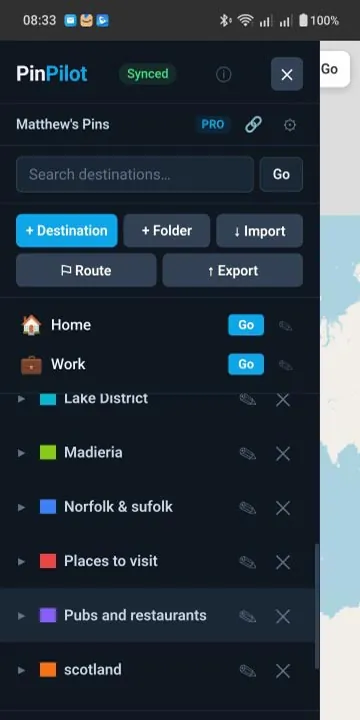
Organise places into folders with 20 pin colours — Pubs, Campsites, Work Sites, Holiday Ideas, Fishing Spots, or any category you like. Show or hide each folder on the map.

Instant Search

Whether you have 20 locations or 2,000, find any saved place instantly. Search across all folders by name or notes.

Route Planning

Build multi-stop routes from your saved locations. Reorder stops, see distances and travel times, and save routes for reuse.

Send & ReceiveNEW

Send a whole folder or a single pin straight to another PinPilot Pro user with their 6-digit code. They get their own copy to keep — contacts are saved automatically and new arrivals pop up in real time.

Share via Link & QRNEW

Generate a link and QR code for any pin and share it by WhatsApp, text or email. It opens in any browser — no app needed.

Highlight PinsNEW

Make a folder's pins pulse on the map so they stand out from the crowd. Highlight as many folders as you like.

Workspace Sharing

Share your locations in real time with family, friends or colleagues. Everyone sees and edits the same workspace live, and you can switch between multiple workspaces.

Paste Google Maps LinksNEW

Found a place on Google Maps? Paste the link — full or short — or a pair of GPS coordinates, and PinPilot flies straight there.

Quick DestinationsNEW

Two one-tap slots at the top of the sidebar for Home and Work — or rename them to Mum's, Office, Marina. Tap Go and you're off.

Import & Export

Import JSON, GeoJSON or Garmin/PocketGPS CSV files. Export as JSON for backups, CSV for spreadsheets, or GPX for other mapping apps.

Works Offline

Your saved pins, folders and routes are always with you — view, add and edit without a signal. Everything syncs when you're back online.

A tour of PinPilot

Colour-coded saved places across the UK in PinPilot
Zoomed-in map of saved pins in Wales
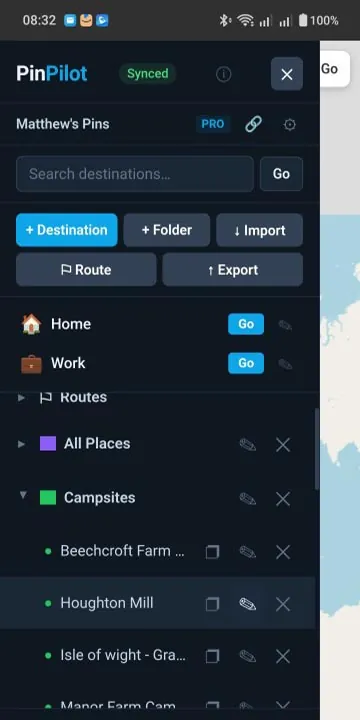
PinPilot sidebar with Home and Work quick destinations and a Campsites folder
List of colour-coded location folders in PinPilot
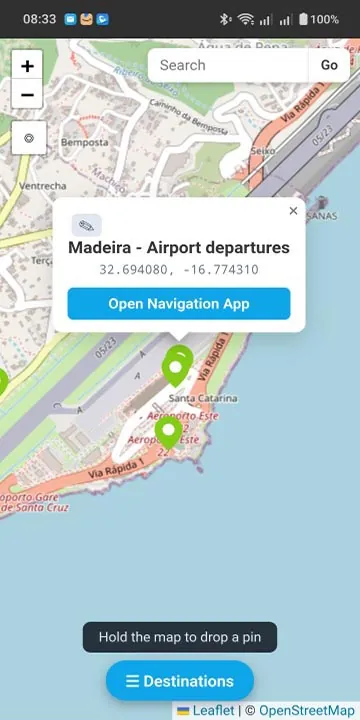
Saved pin popup with GPS coordinates and Open Navigation App button
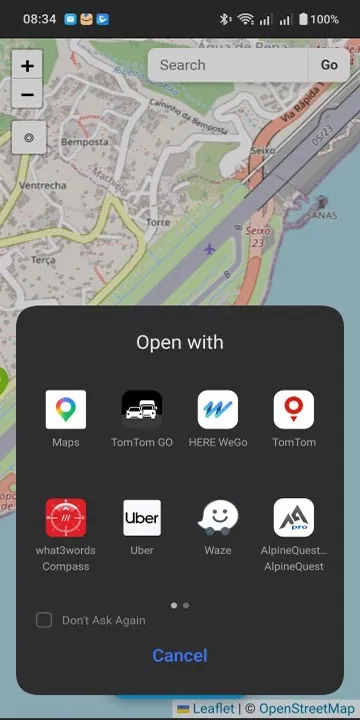
Choosing a navigation app such as Google Maps, Waze or TomTom from PinPilot

How It Works

Four taps. That's it.

1

Drop a Pin

Long-press the map, search an address, paste a Google Maps link, or enter coordinates to mark a location.

2

Save & Organise

Give it a name, pick a folder, add notes and a web link if you like.

3

Find Instantly

Search or browse your folders. Tap any pin on the map to see its details.

4

Navigate

Tap "Open Navigation App" and choose Google Maps, Waze, Apple Maps or any installed nav app.

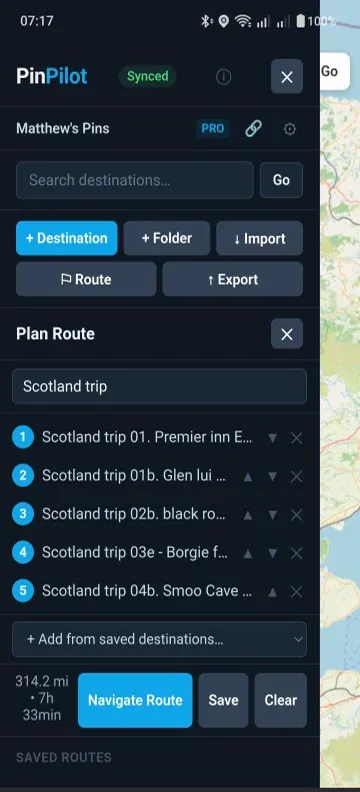
PinPilot multi-stop route planner with reorderable stops
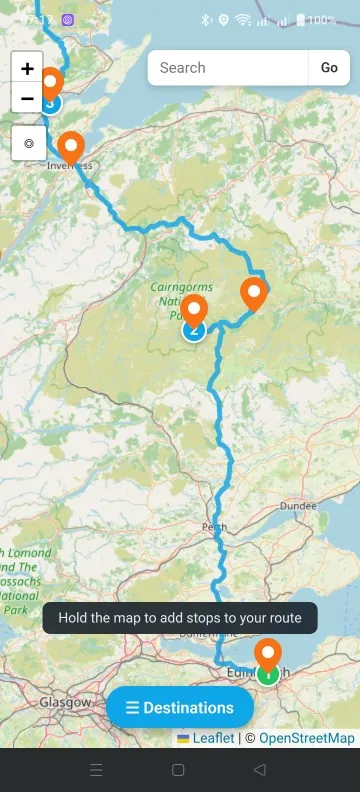
Multi-stop route drawn on the map in PinPilot

Route Planning

Plan multi-stop routes in seconds

Perfect for deliveries, site visits, day trips, or any journey with multiple stops. Build a route from your saved locations, reorder with a tap, and hit the road.

  • Add stops from saved destinations or drop new pins
  • See total distance and estimated travel time
  • Reorder stops with a tap
  • Save routes for future use
  • Launch the full route in Google Maps, Waze or Apple Maps

Send & Receive

Share a place in a couple of taps

Send a folder of campsites to a friend, a job site to a colleague, or tonight's pub to the group chat. Pro users swap pins and folders directly, and anyone can open a shared link — even without PinPilot.

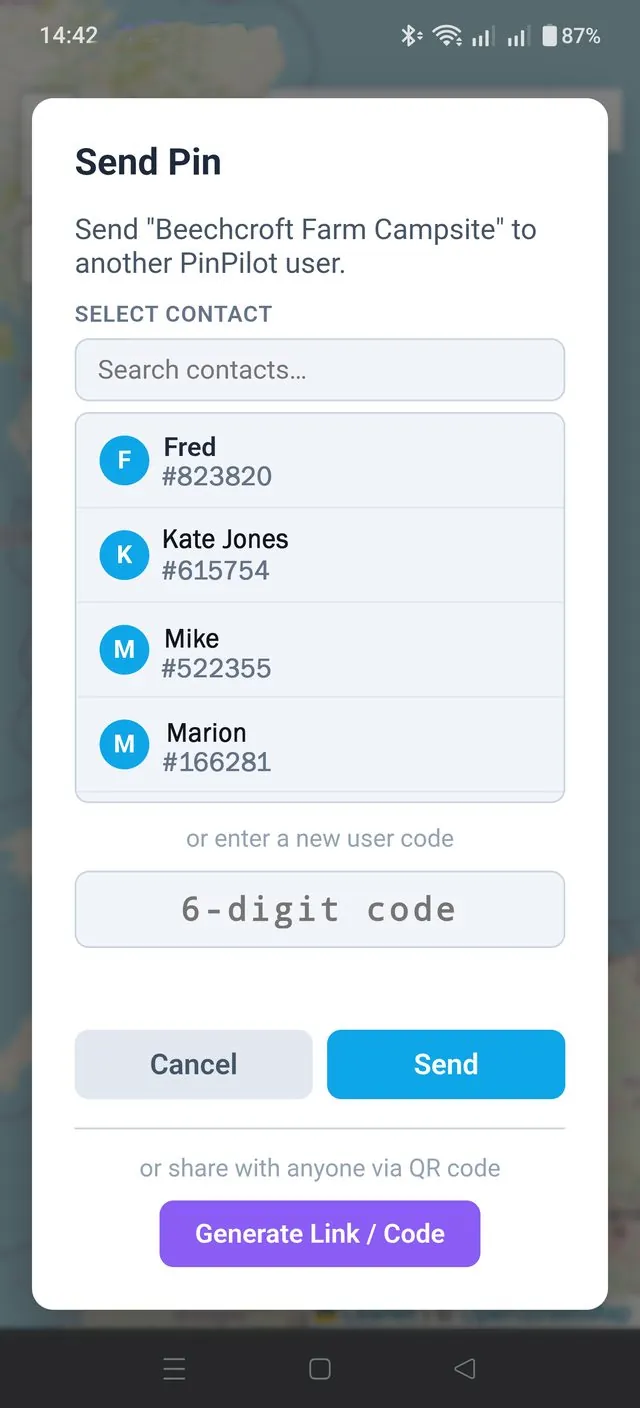
  • Send folders or single pins using a 6-digit user code
  • Contacts are saved automatically — search, rename or remove them
  • Incoming pins arrive in real time with a preview before you accept
  • Track what you've sent, from Pending to Delivered
  • Share any pin by link or QR code — opens in any browser
PinPilot Send Pin screen with contacts, user code entry and Generate Link / Code button

Pricing

No subscriptions. Ever.

Start free, and if you need more, unlock everything with a single one-time purchase.

Free

£0

Get started straight away

  • ✓ Up to 2 folders
  • ✓ Up to 10 locations per folder
  • ✓ Map pins & search
  • ✓ Route planning
  • ✓ Navigate with any app
  • ✓ Highlight pins & quick destinations
  • ✓ Import & export (JSON, CSV, GPX)
  • — Cloud sync
  • — Workspace sharing
  • — Send & Receive pins and folders
  • — Share pins via link & QR code
  • — Web app access
Best Value

Pro

£3.59 once

One-time purchase — yours for life

  • ✓ Unlimited folders
  • ✓ Unlimited saved locations
  • ✓ Map pins & search
  • ✓ Route planning
  • ✓ Navigate with any app
  • ✓ Highlight pins & quick destinations
  • ✓ Import & export (JSON, CSV, GPX)
  • ✓ Secure cloud sync across devices
  • ✓ Real-time workspace sharing
  • ✓ Send & Receive pins and folders
  • ✓ Share pins via link & QR code
  • ✓ PinPilot Web — access from any computer

Built for people who go places

Whether you're exploring the countryside or running a business on the road, PinPilot keeps every location organised and ready.

🏕 Campers🥾 Walkers & Hikers🚐 Caravan & Motorhome🎣 Anglers📸 Photographers🐕 Dog Walkers🚜 Farmers & Contractors🔧 Field Service Engineers🚚 Delivery Drivers🏡 Estate Agents✈️ Holiday Planners📍 Anyone with favourite places

FAQ

Common questions

Is PinPilot free?

Yes. The free version lets you save up to 2 folders with 10 locations each, stored on your device, with map pins, search, route planning and navigation included. PinPilot Pro is a single one-time purchase that unlocks unlimited folders and locations, cloud sync, workspace sharing, Send & Receive and PinPilot Web. There is no subscription.

How is PinPilot different from saved places in Google Maps?

Google Maps keeps saved places in long lists tied to one map app. PinPilot is a dedicated location organiser: colour-coded folders, notes and website links on every pin, instant search, multi-stop routes, and sharing with other people. When you're ready to go, it hands off to Google Maps, Waze, Apple Maps or any navigation app you have installed.

Does PinPilot replace my sat nav or navigation app?

No. PinPilot works alongside your navigation app. Tap Open Navigation App on any saved location and choose Google Maps, Waze, Apple Maps, TomTom or whichever app you prefer, and it opens with the destination already set.

Can I share a location with someone who doesn't have PinPilot?

Yes. PinPilot Pro can generate a link and QR code for any pin. Send it by WhatsApp, text or email and it opens in any web browser, no app needed. Pro users can also send whole folders or single pins directly to each other using a 6-digit user code.

Can I import locations from Google Maps or a Garmin CSV file?

Yes. Paste a Google Maps link (full or short) or a pair of GPS coordinates into the search bar to jump straight to a place, then save it. You can also import JSON, GeoJSON and Garmin/PocketGPS CSV files, and export as JSON, CSV or GPX.

Does PinPilot work offline?

Partly. Your saved locations, folders and routes are always available without a signal, and you can view, add and edit pins offline. Changes sync when you're back online, and your navigation app handles its own offline maps.

Can I use PinPilot on a computer?

Yes, with Pro. Sign in to PinPilot Web at pinpilot.mcm-app.com with the same Google or Apple account you use on your phone. Anything you add or edit syncs instantly to your phone.

More answers in the Help & User Guide.

PinPilot Web

Access your locations from any computer

Pro users can sign in to the web app with the same Google or Apple account. Add and edit locations from your desktop — everything syncs instantly to your phone.

Open PinPilot Web